Showing posts with label TEMPLATES BLOGGER ARABIC. Show all posts

Free Blogger Templates 2014 - Windows 8 Blogger Template 2014

Free Blogger Templates 2014

Free Blogger Templates 2014 - Windows 8 Blogger Template 2014

Free Blogger Themes 2014 - Windows 8 Blogger Template 2014


Windows 8 UI blogger template 2014 es una free blogger template with 1 column, style gallery, fluid width, ideal for photographs photoblogs


Free Blogger Themes 2014 - Windows 8 Blogger Template 2014


DEMO                     DOWNLOAD


 How To Upload Blogger Templates


More Blogger Templates

Windows 8 Blogger Template 2014,free Blogger Templates 2014,Templates Blogger 2014,Free Blogger Themes 2014,Blogger Themes 2014,Themes Blogger 2014,Themes Blogger 2014,Blogger Templates 2014


Saturday, November 30, 2013 | 0 comments | Read More

قالب مدونة حوحو للمعلومياتhoho Blogger Template2014,2014

2014 قالب مدونة حوحو للمعلوميات


قوالب بلوجر معربة 2014


قوالب بلوجر 2014

قالب بلوجر بلون أبيض و رمادي بعمود على اليسار . شكل بسيط و جميل . به خانة للبحث و قائمتين في الأعلى

قوالب بلوجر 2014

DEMO                                   DOWNLOAD


Monday, October 21, 2013 | 3 comments | Read More

Fotografia Blogger Template 2014

Fotografia Blogger Template 2014


Blogger Templates 2014


Templates Blogger 2014


Templates Blogger 2014


DEMO                            DOWNLOAD


INSTALLATION GUIDE


How to upload Blogger template?

1. Download your Blogger XML template.
The template is contained in a zip file (WinZip, WinRAR), make sure you have extracted the XML template.
2. Go to your Blogger dashboard and go to Layout> Edit HTML
3. Be sure to back up your old template in case you decide to use it again. To do this, click on "Download Full Template" and save the file to your hard drive.
4. Find the section at the top where it says "Upload a template from a file on your hard drive"
5. Enter the location of your template and press "Download".
6. The HTML of your new template will appear in the box below. You can preview your template or simply save time and start using it!
7. Enjoy!
Sunday, October 20, 2013 | 1 comments | Read More

Business Style Blogger Template 2014

Business Style Blogger Template 2014


Blogger Templates 2014


Templates Blogger 2014


Templates Blogger 2014 

 DEMO                  DOWNLOAD

INSTALLATION GUIDE


How to upload Blogger template?

1. Download your Blogger XML template.
The template is contained in a zip file (WinZip, WinRAR), make sure you have extracted the XML template.
2. Go to your Blogger dashboard and go to Layout> Edit HTML
3. Be sure to back up your old template in case you decide to use it again. To do this, click on "Download Full Template" and save the file to your hard drive.
4. Find the section at the top where it says "Upload a template from a file on your hard drive"
5. Enter the location of your template and press "Download".
6. The HTML of your new template will appear in the box below. You can preview your template or simply save time and start using it!
7. Enjoy!
Saturday, October 19, 2013 | 1 comments | Read More

Simple Faster v2 Blogger Template 2014

Simple Faster v2 Blogger Template 2014

Blogger Template 2014

Simple Faster v2

 Blogger Template 2014

 DEMO                                  DOWNLOAD


Features

  • Simple design
  • Fast Loading
  • SEO Ready
  • Breadcrumbs
  • Auto Readmore
  • Page Navigation
  • Related post with thumbnail
  • And much more

Instructions

 Before install this template on the blog, there is some code in this v2 Faster Simple template should be edited first. Not much, just replace the Meta Description and Meta Keyword only.

First, instead of writing "YOUR BLOG DESCRIPTION HERE" in the Simple template v2 Faster with pal blog description. Second, instead of writing "BLOG YOUR KEYWORD HERE" in Faster Simple template v2 by keyword or keywords blog buddy.

Friday, October 18, 2013 | 2 comments | Read More

Woles Blogger Templates 2014

 Woles Blogger Templates 2014

Woles Blogger Templates

Blogger Templates 2014

Blogger Templates 2014 


DEMO                DOWNLOAD

Features

SEO Ready certainly
     Simple design only
     Loading lucrative cepet
     Already Auto read more
     No Related Articles
     Share button too
     News ticker widget
     pagination
     and others


 Instructions
 
There are some adjustments that need to be done on this template to make these features in this template can run normally. In the authorities have is:

1. Site Navigation
Login to dashboard> select blog pal> Templates> Edit HTML. After that look for this code:


<ul id='navigation'>
  <li><a href="/">Home</a></li>
  <li><a href="#">News</a></li>
  <li><a href="#">Contact</a></li>
  <li><a href="#">About</a></li>
</ul>

My friend please replace the # (pound sign) with the URL you want to go buddy.

2. Widget News Ticker
Go to dashboard> select your blog> Template> Edit HTML. After that search for this URL

http://wolestemplate.blogspot.com/feeds/posts/default

and replace the red line with your blog address.

3. Everything Else
Go to dashboard> select your blog> Template> Edit HTML. After that search and replace YOUR-FACEBOOK-ID with the ID belongs to my friend facebook.

Thursday, October 17, 2013 | 0 comments | Read More

simple fast v3 blogger template 2014

simple fast v3 blogger template 2014

Simple Faster v3

Blogger Templates 2014

Update template again . Having previously shared Faster Simple template second version, this time I will share the third version with the addition of a new feature that is Custom Mobile Template Ready.

In terms of overall features arguably the same as the previous version, there was no significant change. Only in terms of the appearance of more simple design and are also lighter, light the light once loading see also:


Blogger Templates 2014  

Screenshot Simple Faster v3 (version desktop)

Simple Faster v3 Blogger Templates 2014  

DEMO                                       DOWNLOAD 


Thursday, October 17, 2013 | 0 comments | Read More

Candied Fofinho Blogger Template 2014

Candied Fofinho Blogger Template 2014

Candied Fofinho Blogger Template 2014

Candied Fofinho

Blogger Template 2014


Template blog to cuddly ideal for babies or pregnant women. Hacks and varied menu list and grid menu with credits area social codes in css, extra columns below the posting area, menu pages customized it.

Blogger Template 2014

DEMO                        DOWNLOAD
Monday, October 14, 2013 | 1 comments | Read More

TrendyTube Blogger Template 2014

Blogger Themes / Blogger Template

Trendy Tube


Trendy Tube is a cloned version Blogger Theme of the Youtube Trends Blog


Trendy Tube Blogger Template


DEMO                                   DOWNLOAD


Sunday, October 06, 2013 | 0 comments | Read More

On The Go Blogger Template 2013-2014-2015

Blogger Template 2013-2014-2015


On The Go Blogger Template


Template Name: On The Go Blogger Template

Author of the Template: JavaTemplates

Round Instructions: How to install a Blogger template

Template Instructions:

1. - This template has no options to configure, only installed and used.


DOWNLOAD                                DEMO

More Templates
Friday, September 06, 2013 | 0 comments | Read More

Nublu Blogger Template 2013-2014-2015

Blogger Template 2013-2014-2015

Template Name : Nublu Blogger Template
Author of the template: JavaTemplates
Basic Instructions : How To install Blogger Template
  Instrucciones de la Plantilla:

 1.- Esta plantilla no tiene más opciones que configurar, solo se instala y se usa. 


DOWNLOAD                                              DEMO

More Template 
Friday, September 06, 2013 | 1 comments | Read More

X5 Shadow Blogger Template 2013-2014-2015

X5 Shadow Blogger Template 2013-2014-2015


Template Instructions:

1.-start configuring the box "search", looking in Design / Edit HTML code and reemplamos the following URL (in red) in the URL of your blog.


<div id='topSearch'>
<form action='http://diary-notebook-template.blogspot.com/search' id='searchform' method='get'>
 
 
Two. - To set up social icons (facebook, twitter, feedburner) seek the following code and replace what is in blue by our data.

 
<!-- Begin Social Icons -->
<div id='socialIcons'>
<ul>
<li><a class='twitter tip' href='http://twitter.com/ArianeN_' title='Follow Us on Twitter!'>Follow Us on Twitter!</a></li>
<li><a class='facebook' href='https://www.facebook.com/pages/Templates-Novo-Blogger/208491902533894' title='Join Us on Facebook!'>&quot;Join Us on Facebook!</a></li>
<li><a class='rss' href='http://feeds2.feedburner.com/TemplatesNovoBlogger' title='RSS'>RSS</a></li>
</ul>
<a href='http://templatesparanovoblogger.blogspot.com/2009/02/templates-novo-blogger.html' id='butContact'>Contact</a>
</div>
<!-- End Social Icons -->
 
 
Three. - For updates to Twitter, look for the following code and replace the ID twitter for ours.

 
<div id='twitter'>
<h3>Latest Tweets</h3>
<script>
$(function(){
$(&quot;#twitter&quot;).tweet({
avatar_size: 24,
count: 3,
username: &quot;ArianeN_&quot;,
loading_text: &quot;<span style='color:#999;font-size:11px;'>...searching twitter...</span>&quot;,
//refresh_interval: 10,
template: &quot;{avatar}{text} <br/>{time}&quot;
});
});
</script>
</div>
 
 
There is a script included in the template that allows us to visualize the images in Lightbox style, to use this resource, add the following code in red in the images you upload, you should be well (you can see an example in the first post the "Live Demo").


<div class="separator" style="clear: both; text-align: center;">
<a href="https://blogger.googleusercontent.com/img/b/R29vZ2xl/AVvXsEhqcvFljvAVd_8qjqOak648zGe-SYwdD_rb3jV7IhJ280nmU_h1Vdbzhz2TE0qxywg5GM7QnM4lvrf-2MPI7dofnuf-Fqd5uXiuAdzd2hI2_d94doJeInLZgC8YIFfOFNivHRNbGA2moo6r/s1600/bg3.jpg" imageanchor="1" rel="prettyPhoto"><img border="0" height="266" src="https://blogger.googleusercontent.com/img/b/R29vZ2xl/AVvXsEhqcvFljvAVd_8qjqOak648zGe-SYwdD_rb3jV7IhJ280nmU_h1Vdbzhz2TE0qxywg5GM7QnM4lvrf-2MPI7dofnuf-Fqd5uXiuAdzd2hI2_d94doJeInLZgC8YIFfOFNivHRNbGA2moo6r/s400/bg3.jpg" width="400" /></a></div>
 
 
DEMO                              DOWNLOAD 
Wednesday, September 04, 2013 | 0 comments | Read More
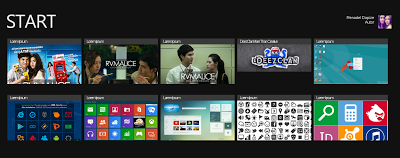
Prozine Blogger Template 2013-2014-2015

 Prozine Blogger Template 2013-2014-2015


Template Instructions:

1. - Started setting social buttons by adding the following code to a widget HTML / Javascript:


<div class='subsboxfull'>
<a href='your-twitter-url' rel='nofollow' target='_blank' title='twitter'><img src="https://blogger.googleusercontent.com/img/b/R29vZ2xl/AVvXsEhqqB5lIE15W6kJmUPwL20KPyJOCvyyMEffq5ZdUbtV4lsZX02FRYzoH1RokWOtmkftbQMULPMNf8fIALGd8CCey578J96TPmTNgk9g9gMCViiVKR6EDa1DoM4h3ULWi0MiiriNG6f6EHs/" /></a>
<a href='your-facebook-url' rel='nofollow' target='_blank' title='facebook'><img src="https://blogger.googleusercontent.com/img/b/R29vZ2xl/AVvXsEhts9qrZglZAlmhszaKw5IFbBMbgrnjra9ODowqQl6qH8K9w9b-68JNz3S4pITExiCVmpiD_7M2o4KhEoB8a1WnffTwPhct4aUuIdTemEbs0sR1FGLYAjczi30Me1Gba9EesyccGVbPIcI/s1600/facebook--box.png" /></a>
<a href='your-delicious-url' rel='nofollow' target='_blank' title='delicious'><img src="https://blogger.googleusercontent.com/img/b/R29vZ2xl/AVvXsEiSWieKihNKUMUQix2RzeM2MIeg3bYi1cax7jE9ZtbPrE6h7ETgnoMFLWqyW6oiRORZMcV-IYnc5UUlP_gjG2hRwtKf5HkelNyFo3SAN-g0cNjVHP7Vv1inM4j1aK8MG0JYxE9D6zpZIGc/s1600/delicious-box.png" /></a>
<a href='your-stumbleupon-url' rel='nofollow' target='_blank' title='stumbleupon'><img src="https://blogger.googleusercontent.com/img/b/R29vZ2xl/AVvXsEgYk1_fr3v-vKxDD7WszT6YdgDq9DBsQ7mGIMYqbv6fEOL1FUIpyX4sE0MvHTmpY0V3jhgnDqMG_BBcGBqA4UByx7IMCCRqt50DKsdfFu5QSPxri_EvV8rzihxWDEf0A4qkoKXickGlnKQ/" /></a>
<a href='your-linkedin-url' title='linkedin'><img src="https://blogger.googleusercontent.com/img/b/R29vZ2xl/AVvXsEjIBf6CLwlbdfm5MO8nOhYok5T8xahdWEvCN15yF-XMCFuqcTIn2TdsgOQEQNBmI-8YBDvE0EdvzueIPKb8FnaY-B2N-BLq827VpAiYS6r_GZfF2KVur50HSNBkoo1TTMh8c21JUpE8n8U/" /></a>
<a href='your-contact-url' title='contact'><img src="https://blogger.googleusercontent.com/img/b/R29vZ2xl/AVvXsEiwCwPVIPUCguvkZhriQkwKwJxr09ief81-wDPpjeFo_WXp6Te93skMby7NDT6C8BymnQZ5U6UyKplQ-EWe93kLKF7o31doVPVadW1inSqFhzY4zDVy4HsjDqYuXFYbaAxrzKhluCXziL4/" /></a>
<form action='http://feedburner.google.com/fb/a/mailverify?uri=YOUR-FEEDBURNER-ID&loc=en_u' method='post' onsubmit='window.open('http://feedburner.google.com/fb/a/mailverify?uri=YOUR-FEEDBURNER-ID', 'popupwindow', 'scrollbars=yes,width=550,height=520');return true' target='popupwindow'><p><input name="email" style="width:230px; border: 1px solid #ccc; padding: 5px;" type="text" value="Enter your email address" /></p><input name="uri" type="hidden" /><input name="loc" type="hidden" value="en_US" /></form>
<p><span><a class='rss-boxicon' href='http://feeds2.feedburner.com/YOUR-FEEDBURNER-ID' rel='nofollow' target='_blank'>RSS</a></span>
<span><a class='email-boxicon' href='http://feedburner.google.com/fb/a/mailverify?uri=YOUR-FEEDBURNER-ID&loc=en_u' rel='nofollow' target='_blank'>Email</a><span><span style="float:right;"><a href='http://feeds.feedburner.com/YOUR-FEEDBURNER-ID' rel='nofollow'><img alt="" height="26" src="http://feeds.feedburner.com/~fc/YOUR-FEEDBURNER-ID?bg=ff9900&amp;fg=000033&amp;anim=0" style="border:0;float:right;margin-top:0px;" width="88" /></a></span></span></span></p>
</div>
 Two. - To set the Tab, add the following code to a widget HTML / Javascript. Then edit the sections in red with HTML code.

<div id='tabzine'>
<ul class='tabnav'>
<li class='pop'><a href='#tab11'>Video</a></li>
<li class='fea'><a href='#tab22'>Recent</a></li>
<li class='rec'><a href='#tab33'>Popular</a></li>
</ul>
<!-- tab1 -->
<div class='tabdiv' id='tab11'>
ENTER-TAB-1-CONTENT-HERE
</div>
<!--/tab1-->
<!-- tab2 -->
<div class='tabdiv' id='tab22'>
ENTER-TAB-2-CONTENT-HERE
</div>
<!-- tab2 -->
<!-- tab3 -->
<div class='tabdiv' id='tab33'>
ENTER-TAB-3-CONTENT-HERE
</div>
<!-- /tab3 -->
</div>/
Three. - To set the Slider, add the following code to a widget HTML / Javascript, position it below the "header" and edit the sections in red.

<script type="text/javascript">
stepcarousel.setup({
galleryid: 'mygallery', //id of carousel DIV
beltclass: 'belt', //class of inner "belt" DIV containing all the panel DIVs
panelclass: 'panel', //class of panel DIVs each holding content
autostep: {enable:true, moveby:1, pause:3000},
panelbehavior: {speed:500, wraparound:true, persist:true},
defaultbuttons: {enable: true, moveby: 1, leftnav: ['https://blogger.googleusercontent.com/img/b/R29vZ2xl/AVvXsEhhLmxDqlgbYWqKMKWxZRe85Fyr3PGzlRIW1L-wTHGu3_i0MkowgFU6SSTMoDz48Shk4K3zpqXtBR_Mid-f_Gb3xG_Hq25sRQs3tsaOXyqfRB4YhAsINwopgIYFyjw96hpynYLsuYObJUM/', -29, 90], rightnav: ['https://blogger.googleusercontent.com/img/b/R29vZ2xl/AVvXsEhzy3wIVC07xxODKZJtIi0Q-Uo0lQal936Fc8CZQ4XeUC1taVacZJuaZiRAt7G2hRFN7Vu3_hTu0SWqi6s4n38ezO4gaPxEfyCnCkLzW4RkWZD_sFvAJvNlpEo7O8xgMfrsYs-HRHT7sPQ/s1600/fleche2.png', -18, 90]},
statusvars: ['statusA', 'statusB', 'statusC'], //register 3 variables that contain current panel (start), current panel (last), and total panels
contenttype: ['inline'] //content setting ['inline'] or ['external', 'path_to_external_file']
})
</script>

<div id="slider">
<div id="mygallery" class="stepcarousel">
<div class="belt">
<div class="panel">
<img src="URL DE LA PRIMER IMAGEN" alt="" />
<h2><a href="LINK 1">TITULO 1</a></h2>
<p>DescripciOn...</p>
</div>
<div class="panel">
<img src="URL DE LA SEGUNDA IMAGEN" alt="" />
<h2><a href="LINK 2">TITULO 2</a></h2>
<p>DescripciOn...</p>
</div>
<div class="panel">
<img src="URL DE LA TERCERA IMAGEN" alt="" />
<h2><a href="LINK 3">TITULO 3</a></h2>
<p>DescripciOn...</p>
</div>
<div class="panel">
<img src="URL DE LA CUARTA IMAGEN" alt="" />
<h2><a href="LINK 4">TITULO 4</a></h2>
<p>DescripciOn...</p>
</div>
<div class="panel">
<img src="URL DE LA QUINTA IMAGEN" alt="" />
<h2><a href="LINK 5">TITULO 5</a></h2>
<p>DescripciOn...</p>
</div>
</div>
</div>
</div>
April. - For the date to display correctly, we go to "Settings / Language and Format", and in "Time format" select the format.

 
 DEMO                                                             DOWNLOAD
Wednesday, September 04, 2013 | 0 comments | Read More

Johny Goreng Blogger Templates

Johny Goreng Blogger Templates

responsive template

My friend Maskolis now offers responsive templates. Known for his sophisticated themes, and simple, this template is not responsive the least.

Demo   |   Download   |   Instructions
Sunday, August 25, 2013 | 0 comments | Read More

Pinfinity Blogger Template

Pinfinity Blogger Template

Blogger template 2014

BUD Pinterest clone for Blogger, combining elegance and simplicity. This template includes a drop-down buttons for social networking and a single sidebar menu.

Demo   |   Download  |   Instructions
Sunday, August 25, 2013 | 0 comments | Read More
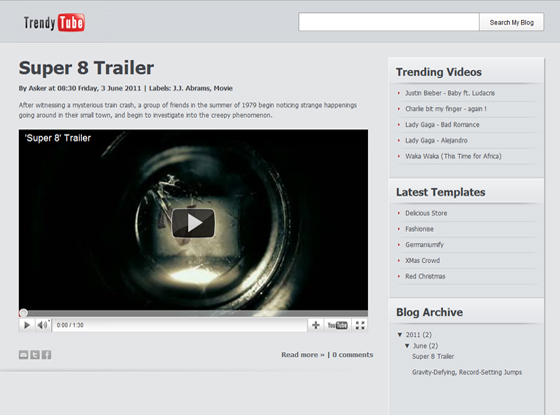
Extra News Blogger Template

Extra News Blogger Template


Inspired by the same name template Wordpress is one of the most successful for magazines or news blogs. This template also has a very original automatic featured (Inspired TheVerge) part, and a good management widget on different screens
 
Demo   |   Download
Sunday, August 25, 2013 | 0 comments | Read More

Main Photo Responsive Blogger Template

Main Photo Responsive Blogger Template


This is one of the best templates responsives with a simple, clean, minimalist design. I recommend it for its automatic slider (managed only by the labels), but also because it is very easy to change, since it can be modified using the tool for creating templates Blogger.
 
Demo   |   Demo  
Sunday, August 25, 2013 | 2 comments | Read More

Monoprix Blogger Template

Monoprix Blogger Template:

 
Monoprix Blogger theme is a fully optimized theme created by the owner of MBT great blog. It is a clean and well cared for model prepared for SEO, with very professional drop down menus with the best possible locations for a pub. It has also been renovated for adaptability with all internet browsers.


blogger themes, blogspot themes 

Download                                                           Demo
Sunday, August 25, 2013 | 0 comments | Read More

ModernCars Blogger Template 2013-2014-2015

ModernCars Blogger Template 2013-2014-2015

Excellent template for blogger about cars with impeccable slider effect and is very easy to install requires no advanced settings.

Modern Cars Blogger Template 2013-2014-2015 


    DEMO                               DOWNLOAD
Sunday, June 02, 2013 | 1 comments | Read More
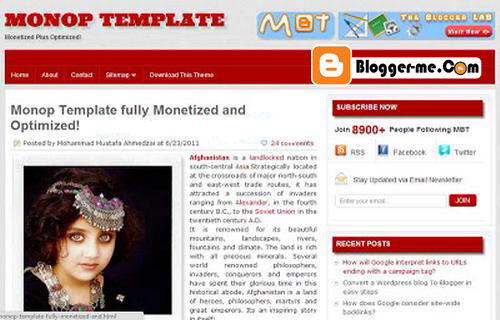
Provogue Blogger Templates 2013-2014-2015

 Provogue Blogger Templates 2013-2014-2015

Blogger Templates

Blogger


 DEMO                                     DOWNLOAD


INSTALLATION GUIDE
How to upload Blogger template?

1. Download your Blogger XML template.
The template is contained in a zip file (WinZip, WinRAR), make sure you have extracted the XML template.
Two. Go to your Blogger dashboard and go to Layout> Edit HTML
Three. Be sure to back up your old template in case you decide to use it again. To do this, click on "Download Full Template" and save the file to your hard drive.
April. Find the section at the top where it says "Upload a template from a file on your hard drive"
May. Enter the location of your template and press "Download".
June. The HTML of your new template will appear in the box below. You can preview your template or simply save time and start using it!
July. Enjoy!
Friday, May 03, 2013 | 0 comments | Read More